
VICIdial Installation & Configuration: Complete Guide for Call Centers (2026)
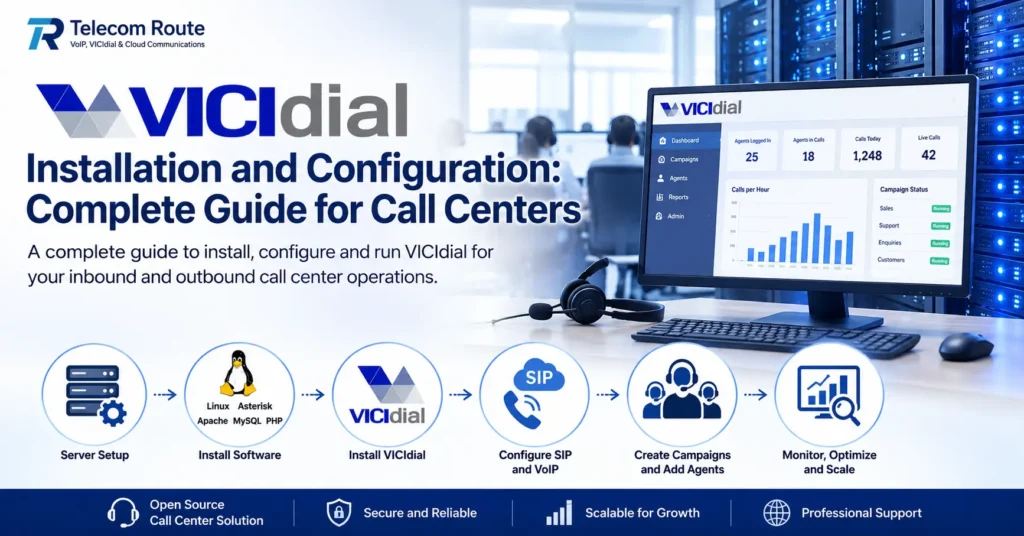
VICIdial installation and configuration is the foundation of a reliable call center dialer system. When VICIdial is properly installed and configured, businesses can manage inbound and outbound campaigns, agents, call routing, reporting, and other call center operations from a centralized platform.
In this guide, we explain the main steps involved in setting up and configuring VICIdial for call centers, including server preparation, system installation, SIP/VoIP configuration, campaigns, users, agents, and basic troubleshooting.
Whether you are setting up VICIdial for a small call center or a larger operation, proper configuration is important for call quality, system stability, and efficient agent management.
What Is VICIdial?
VICIdial is an open-source contact center software platform that helps businesses manage inbound and outbound calling operations. It provides tools for managing agents, campaigns, call routing, call recording, reporting, and other day-to-day call center activities.
VICIdial can be deployed on a suitable Linux server and connected with compatible SIP/VoIP services. Its flexibility makes it suitable for businesses that want to build and manage their own call center environment rather than depend entirely on a proprietary dialer platform.
VICIdial Installation Requirements
Before installing VICIdial, it is important to prepare a suitable server and network environment. The server should have adequate CPU, RAM, storage, and network capacity based on the expected number of agents and calls. A stable internet connection and properly configured SIP/VoIP connectivity are also important for reliable call-center operations.
Server Requirements
The required server resources depend on the size and configuration of the call center. A small deployment may require fewer resources, while larger call centers need additional processing power, memory, storage, and network capacity. Server planning should therefore be based on the expected number of concurrent calls, agents, recordings, and other services running on the system.
VICIdial Installation Process
1. Prepare the Server
The first step is to prepare a suitable server for the VICIdial setup. The server should have the required operating system, sufficient CPU and memory resources, adequate storage, and reliable network connectivity. Server resources should be planned according to the expected number of agents and concurrent calls.
2. Install the Required Software
VICIdial depends on several underlying software components to provide its call center functionality. The installation environment should be prepared according to the VICIdial version and its documented requirements. Keeping the operating system and required components properly configured helps provide a stable foundation for the dialer.
3. Install VICIdial
After preparing the server environment, VICIdial can be installed and configured according to the deployment requirements. The installation process establishes the VICIdial application, database, web interface, and associated telephony components required for call center operations.
4. Configure the VICIdial System
After installation, the system needs to be configured for the business’s calling requirements. This can include system settings, users, agents, campaigns, call routing, telephony settings, recording options, and other operational parameters.
SIP and VoIP Configuration for VICIdial
VICIdial requires properly configured telephony connectivity to make and receive calls. SIP and VoIP connectivity can be used to connect the VICIdial system with compatible voice services and carriers. Correct SIP configuration is important for call quality, reliable call routing, and stable call-center operations.
Configure SIP Connectivity
SIP connectivity should be configured according to the requirements of the selected VoIP provider and VICIdial deployment. Important settings can include SIP credentials, server or trunk details, authentication, codecs, ports, and network configuration. The exact configuration depends on the SIP service and infrastructure being used.
Test Inbound and Outbound Calling
After configuring SIP connectivity, both inbound and outbound calling should be tested before putting the system into production. Test calls can help verify registration, audio quality, caller ID, call routing, and overall connectivity between VICIdial and the voice provider.
VICIdial Campaign Configuration
After the basic VICIdial setup and telephony configuration are complete, campaigns can be configured according to the call center’s operational requirements. Campaign settings help define how calls are handled, how agents work with customers, and how the dialer operates during calling activities.
Create and Configure Campaigns
VICIdial campaigns can be configured for different inbound, outbound, or blended calling requirements. Campaign configuration may include dialing settings, call routing behavior, agent availability, call recording, and other options required for the specific operation.
Add Agents and Users
Agents and users should be created with appropriate permissions and assigned to the required campaigns. Proper user and agent configuration helps administrators control access and organize daily call center operations.
Configure Calling Lists
Outbound campaigns can use calling lists containing customer or prospect information. Lists should be imported and configured carefully so that the correct campaign, dialing settings, and agent workflow are applied to the intended contacts.
VICIdial Call Recording, Monitoring and Reporting
VICIdial provides tools that help call center administrators monitor calling operations, review agent activity, record calls, and analyze campaign performance. These functions can help businesses improve quality, agent performance, customer service, and operational visibility.
Call Recording
Call recording can be configured for appropriate VICIdial campaigns and call-center requirements. Recorded calls can be useful for quality assurance, agent training, customer service reviews, and internal operational processes. Recording policies should be configured according to the business’s requirements and applicable regulations.
Live Agent Monitoring
Administrators can monitor agent and campaign activity through the VICIdial administration environment. Monitoring can help supervisors identify calling issues, review agent activity, and maintain better visibility into ongoing call-center operations.
Reports and Analytics
VICIdial provides reporting capabilities for reviewing campaign and agent activity. Reports can help businesses analyze calls, agent performance, campaign results, and other operational information needed for managing a call center.
VICIdial Security and Server Optimization
A properly configured VICIdial server should be secured and optimized before being used for production call-center operations. Server security, resource management, network configuration, and regular maintenance can help improve system reliability and reduce avoidable operational problems.
Secure the VICIdial Server
Access to the VICIdial server should be restricted to authorized users and administrators. Strong authentication, appropriate firewall rules, secure administrative access, regular system updates, and proper permission management can help protect the server and call-center environment.
Optimize Server Resources
VICIdial server resources should be selected according to the expected number of agents, concurrent calls, call recordings, campaigns, and other services running on the system. Monitoring CPU, memory, storage, and network usage can help identify resource limitations before they affect call-center performance.
Monitor System Performance
Regular monitoring helps administrators identify unusual resource usage, connectivity problems, storage issues, and other system conditions that may affect VICIdial operations. Proactive monitoring and maintenance can help keep the call-center environment stable as usage increases.
Troubleshooting Common VICIdial Problems
Even after a successful installation, VICIdial can experience configuration or connectivity problems. Common issues can involve SIP registration, call quality, audio, server resources, call routing, or campaign configuration. Identifying the source of the problem systematically can help reduce downtime.
SIP Registration Problems
If a SIP account or trunk is not registering correctly, check the SIP credentials, server address, authentication settings, network connectivity, firewall configuration, and provider requirements. Reviewing the relevant logs and testing connectivity can help identify the cause.
One-Way Audio or No Audio
Audio problems can be related to network configuration, firewall rules, NAT, RTP settings, codecs, or SIP configuration. Checking the network path and telephony settings on both sides of the connection can help identify and resolve audio problems.
Poor Call Quality
Poor voice quality may be caused by network congestion, latency, packet loss, insufficient server resources, or incorrect codec configuration. Monitoring network and server performance can help determine whether the problem originates from the infrastructure or the voice connection.
VICIdial Performance Issues
If VICIdial becomes slow or unstable, check CPU, memory, storage, database activity, network usage, and the number of concurrent calls. Resource monitoring can help identify whether the server needs optimization or additional capacity.
VICIdial Scaling for Growing Call Centers
As a call center grows, its VICIdial environment may require additional server resources and infrastructure. Scaling should be planned according to the number of agents, concurrent calls, campaigns, recordings, and overall system workload.
Start With the Right Server Resources
Smaller call centers can begin with an appropriately sized server based on their expected workload. CPU, RAM, storage, and network capacity should be evaluated before deployment so the system has sufficient resources for the planned operation.
Scale Resources as Usage Grows
When the number of agents or concurrent calls increases, server resources may need to be increased. Monitoring actual resource utilization helps determine when additional CPU, memory, storage, or network capacity is required.
Multi-Server VICIdial Deployments
Larger call-center environments may require a multi-server architecture instead of relying on a single server. Multi-server deployments can separate workloads and provide additional capacity as the operation grows. The appropriate architecture depends on the call center’s size, traffic, applications, and infrastructure requirements.
Hosted VICIdial vs Self-Hosted VICIdial
Businesses can choose between managing their own VICIdial infrastructure or using managed VICIdial hosting. The right approach depends on technical expertise, available resources, security requirements, maintenance responsibilities, and the expected size of the call center.
Self-Hosted VICIdial
With a self-hosted VICIdial deployment, the business is responsible for the server infrastructure, installation, configuration, security, updates, monitoring, troubleshooting, and ongoing maintenance. This approach can provide greater control but requires appropriate technical knowledge and resources.
Managed VICIdial Hosting
Managed VICIdial hosting provides the server infrastructure together with technical assistance for installation, configuration, security, monitoring, troubleshooting, and maintenance. This can be useful for businesses that want to focus on their call-center operations without managing the complete server environment themselves.
Which Option Is Right for Your Call Center?
A self-hosted deployment may be appropriate for organizations with their own experienced technical team and infrastructure requirements. Managed hosting can be a practical option for businesses that prefer professional infrastructure and ongoing technical support. The decision should be based on the call center’s technical capabilities, workload, budget, and long-term growth plans.
Conclusion
A properly installed and configured VICIdial system can provide a flexible foundation for inbound and outbound call-center operations. Successful deployment requires appropriate server resources, reliable SIP/VoIP connectivity, correct campaign and agent configuration, security, monitoring, and ongoing maintenance.
Businesses can choose self-hosted VICIdial or managed VICIdial hosting depending on their technical capabilities, infrastructure requirements, budget, and expected growth. Professional technical support can also help businesses deploy, troubleshoot, and maintain their VICIdial environment.
Need Help Setting Up VICIdial?
Telecom Route provides VICIdial hosting, installation, configuration, VoIP and SIP solutions, server infrastructure, and technical support for businesses and call centers. If you need assistance setting up or managing your VICIdial environment, contact Telecom Route to discuss your requirements.
[…] process can happen automatically and in a very short time, allowing businesses and call centers to manage large volumes of calls across multiple carriers and […]
[…] There is no single server configuration that is ideal for every VICIdial installation. […]
[…] VICIdial Installation & Configuration: 7-Step Reliable Guide […]